
If you’re searching for how to delete a Google review, you’re not alone. Whether you accidentally posted the wrong feedback, changed your opinion about a business, or want to remove a negative or fake review, Google allows users to delete or edit reviews they have written. In this step-by-step guide, we’ll explain exactly how to delete a Google review from desktop and mobile, how businesses can report inappropriate reviews, and what to do if the delete option doesn’t appear.
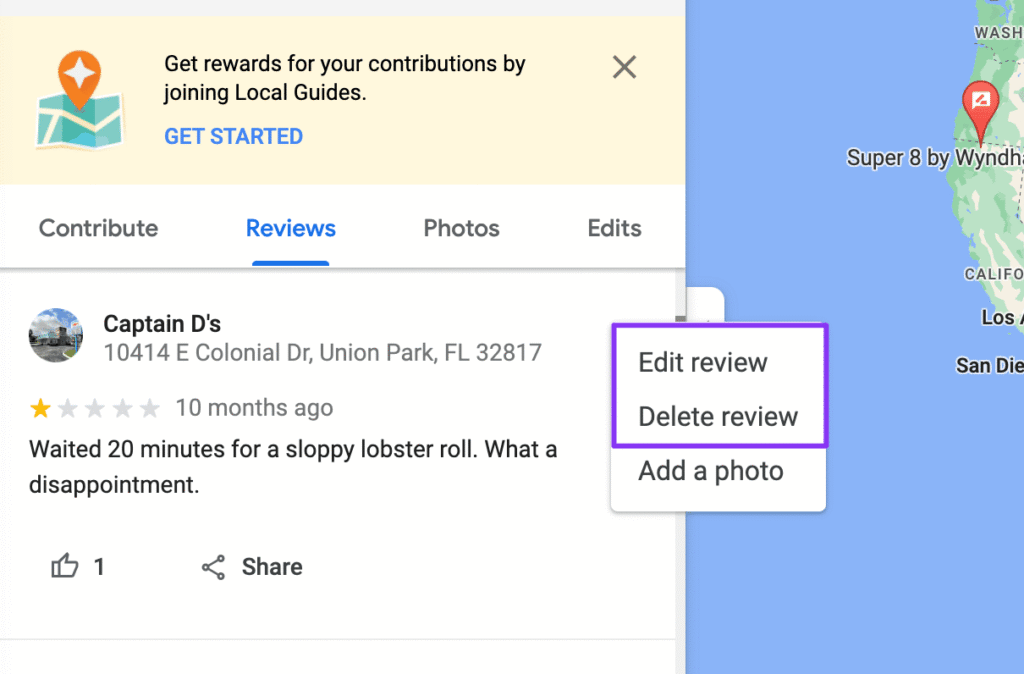
How to delete a Google review on a Android phone.
- Open the Google Maps app.
- Tap Contribute (+) at the bottom of the screen.
- Select View your profile.
- Scroll down and tap See all reviews.
- Find the review you want to edit or delete.
- Tap the More (⋮) three-dots menu next to the review.
- Select Edit review or Delete review, and follow the instructions displayed.
Note: If you make changes to your review, the updated date will appear as the new posting date.
Also Check: A updated list of Indian scammer numbers 2026.
How to delete a Google review on a iPhone & iPad
- Open the Google Maps app.
- Tap Contribute (+).
- Choose View your profile.
- Scroll and tap See all reviews.
- Locate the review you want to modify or remove.
- Tap the More (⋮) three-dots menu next to the review.
- Select Edit review or Delete review, then follow the on-screen steps.
Note: If you update your review, the latest edit date will appear as the new posting date.
How to delete a Google review on a Computer.
- Open Google Maps on your computer.
- Click the Menu (☰) icon in the top-left corner.
- Select Your contributions, then go to the Reviews tab.
- Locate the review you want to update or remove.
- Click the More (⋮) three-dots menu next to the review.
- Choose Edit review or Delete review, then follow the on-screen instructions.
Note: If you update your review, Google will display the most recent edit date as the new posting date.